Business & Resources
How to Download All Your Photos from Facebook
Facebook may not be the dominant social network it once was, but for millions of users, it still holds years of irreplaceable photographic memories — wedding...
Facebook may not be the dominant social network it once was, but for millions of users, it still holds years of irreplaceable photographic memories — weddings, graduations, births, and vacations buried in old profile albums. Fortunately, Facebook provides a straightforward, built-in tool to download your entire photo library in one batch. Below is a quick guide to pulling your photos off the platform, whether you're on a computer or a mobile device.

Download All Your Photos in One Batch (Computer)
- Log into Facebook and click your profile picture in the top-right corner.
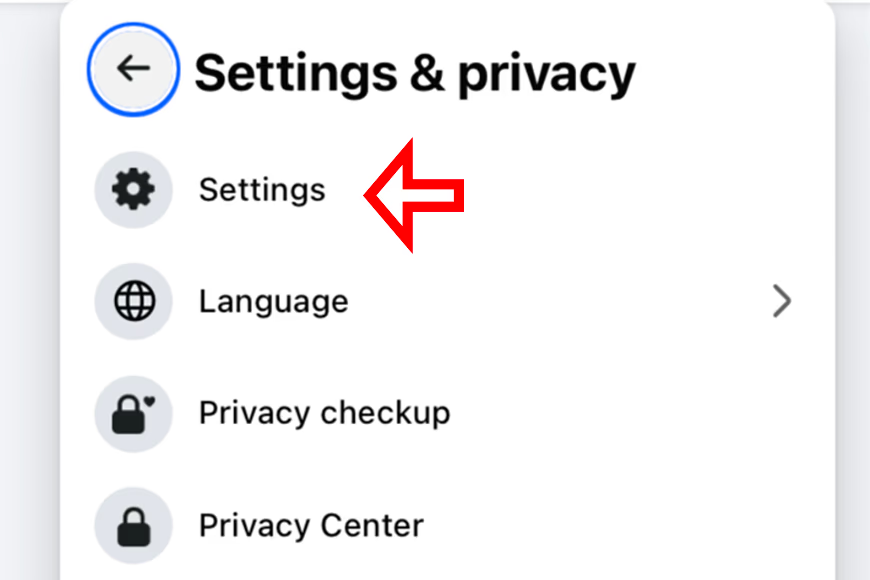
- Select Settings & Privacy, then click Settings.
- In the left-hand sidebar, click Your Facebook Information.
- Select Download Your Information.
- Click Deselect All, then scroll down and check only the box labeled Photos and Videos.
- Choose your preferred Date Range, Format (HTML is easiest to browse), and Media Quality (set to High for the best image resolution).
- Click Request a Download. Facebook will compile your archive — this can take several minutes or hours depending on the size of your library — and notify you via email when it is ready.
- Once the file is ready, you will receive a notification and can click the download link to save the ZIP archive to your computer.
Download Photos Using the Facebook Mobile App
The process is essentially identical on a smartphone. From the Facebook app:
- Tap the Menu (hamburger icon).
- Scroll to Settings & Privacy and tap Settings.
- Under Your Information, tap Download Your Information.
- Follow the same steps as above: deselect all, check only Photos and Videos, set your quality to High, and request the download.
- Your archive will be compiled by Facebook's servers. Take care to download it over a stable Wi-Fi connection, as the ZIP file can be large.
How to Download a Single Photo or Album
If you only need a few specific images rather than your entire library, you can avoid the full archive download:
- Single Photo: Open the photo, click the three-dot menu in the top-right corner, and select Download.
- Entire Album: Open the album, click the three-dot menu, and select Download Album. Facebook will compile all images from that album into a single ZIP file for you.
Practical Tips
- Use a computer for large archives. Downloading a decade's worth of photos over a mobile connection can eat through data caps and take hours.
- Sort and back up immediately. Once downloaded, organize your files into cleanly labeled folders (such as by year or event) and back them up to an external hard drive or a secure cloud storage solution.
- Choose High quality. The default medium compression can leave photos looking noticeably soft. Always select the High quality option before requesting the download.
Final Thoughts
Downloading all your photos from Facebook is a simple but critical step in taking ownership of your digital memories. Backing them up locally and then storing a second copy in a cloud service or on an external drive ensures that even if a platform changes its policies or an account becomes inaccessible, your photographic history remains safe in your hands.
FAQ
How long does it take for Facebook to compile my photo archive? It depends on the size of your library. Most archives are ready within 30 minutes to a few hours. Facebook sends an email notification and an on-platform alert when the file is prepared, and the download link remains active for several days.
Can I download photos that other people have tagged me in? Yes. The download tool includes photos uploaded by others where you are tagged. These images may be slightly lower resolution than the originals, as Facebook compresses files upon upload.
What format do the photos download in? Your photos are packaged into organized HTML folders in a ZIP file. You can click through them in a web browser or extract the raw JPEG files directly from the archive folders.