Gear & Apps
SanDisk Ultra vs Extreme: Which Memory Card Should You Choose?
Introduction SanDisk Ultra and SanDisk Extreme are two popular SD card lines from Western Digital. Choosing between them comes down to understanding their ke...
Introduction
SanDisk Ultra and SanDisk Extreme are two popular SD card lines from Western Digital. Choosing between them comes down to understanding their key differences in speed, video capabilities, and intended use. This guide compares both lines to help you make the right choice for your photography needs.
SanDisk Ultra Overview

The Ultra is SanDisk's mid-range line, designed primarily for smartphones and entry-level cameras. It's widely compatible and very affordable.
Key Specs:
- Read speeds up to 120-150 MB/s
- Supports Full HD (1080p) video
- Available in SD, microSD, and microSD with adapter
- Capacities from 16GB to 1.5TB
- Rated U1 (minimum 10 MB/s write speed)
Limitations: Not fast enough for 4K video or high burst rates from professional cameras. Write speeds are significantly lower than read speeds and not always specified.
SanDisk Extreme Overview
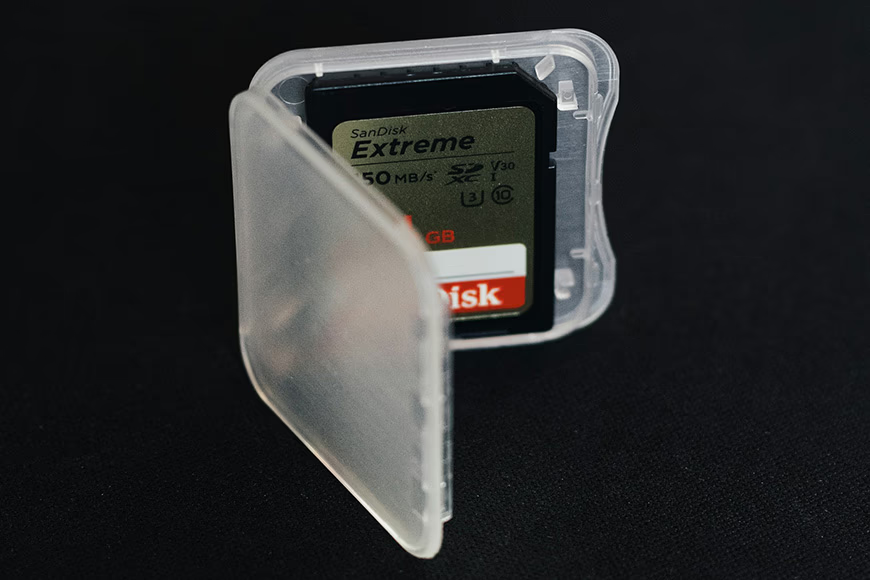
The Extreme line offers faster performance for more demanding photography and videography. It's available in SD, microSD, and CompactFlash formats.
Key Specs:
- Read speeds up to 190 MB/s
- Write speeds up to 130 MB/s
- Supports 4K/UHD video recording
- Rated U3 (minimum 30 MB/s write speed)
- Video Speed Class V30
- Capacities from 32GB to 1TB
Note: Don't confuse the Extreme with the top-tier Extreme Pro, which offers even higher performance at a premium price.
Key Comparison Points
Read/Write Speeds
The Extreme clearly wins here. While Ultra offers 120-150 MB/s read speeds, the Extreme reaches 190 MB/s. More importantly, the Extreme's faster write speed (up to 130 MB/s) handles burst photography and 4K video that the Ultra cannot sustain.
Video Recording
SanDisk Ultra: Full HD (1080p) only. Not suitable for 4K.
SanDisk Extreme: 4K/UHD video at constant speed. The V30 rating guarantees minimum 30 MB/s sequential write speed.
Speed Class Ratings
| Feature | Ultra | Extreme |
|---|---|---|
| UHS Speed Class | U1 (10 MB/s min) | U3 (30 MB/s min) |
| Speed Class | C10 | C10 |
| Video Class | Typically none | V30 |
Durability
Both lines offer solid durability. Extreme cards add temperature-proof, waterproof, and shockproof ratings for demanding environments.
Which Should You Choose?
Choose SanDisk Ultra if:
- You shoot with entry-level cameras or smartphones
- You primarily capture still photos at normal burst rates
- You record 1080p video only
- Budget is a primary concern
Choose SanDisk Extreme if:
- You shoot with high-resolution cameras
- You use continuous burst mode frequently
- You record 4K/UHD video
- You need faster file transfers to your computer
Conclusion
For casual photographers using entry-level gear, the SanDisk Ultra offers excellent value. For anyone shooting 4K video, using burst mode, or working with high-resolution files, the SanDisk Extreme is worth the extra investment. The faster write speeds and V30 rating make a noticeable difference in real-world shooting.
FAQ
Can I use SanDisk Ultra for 4K video? No. The Ultra line lacks sufficient write speed for 4K video. You need at least a SanDisk Extreme with its V30 rating for reliable 4K recording.
What's the difference between Extreme and Extreme Pro? Extreme Pro offers even faster speeds (up to 300 MB/s), uses UHS-II interface on some models, and targets professional photographers and videographers with the highest performance demands.
Is SanDisk Extreme worth the extra cost? Yes, if you shoot burst photography, raw files, or 4K video. The faster write speeds prevent buffer delays and ensure reliable recording. For basic photography, Ultra is sufficient.
How do I check my card's speed class? Look at the card's label. U1 or U3 inside a U-shaped symbol indicates the UHS speed class. V30, V60, or V90 indicates the video speed class. A number inside a circle (like 10) is the standard speed class.
Do I need a special card reader for Extreme cards? No, standard SD card readers work with both Ultra and Extreme cards. However, a USB 3.0 reader helps achieve the Extreme's faster transfer speeds.